Some fetch failures are obvious. The page times out, the batch stalls, the error is logged. The harder ones look like successes. Status 200. Content returned. 14 characters of text.
In our own testing across 200 URLs, over 10% of "successful" fetches came back nearly empty - enough content to pass, not enough to reason on.
Fetching the page was never the hard part. Getting something an agent can actually use is.
Today we’re launching TinyFish Fetch API to solve that layer end-to-end.
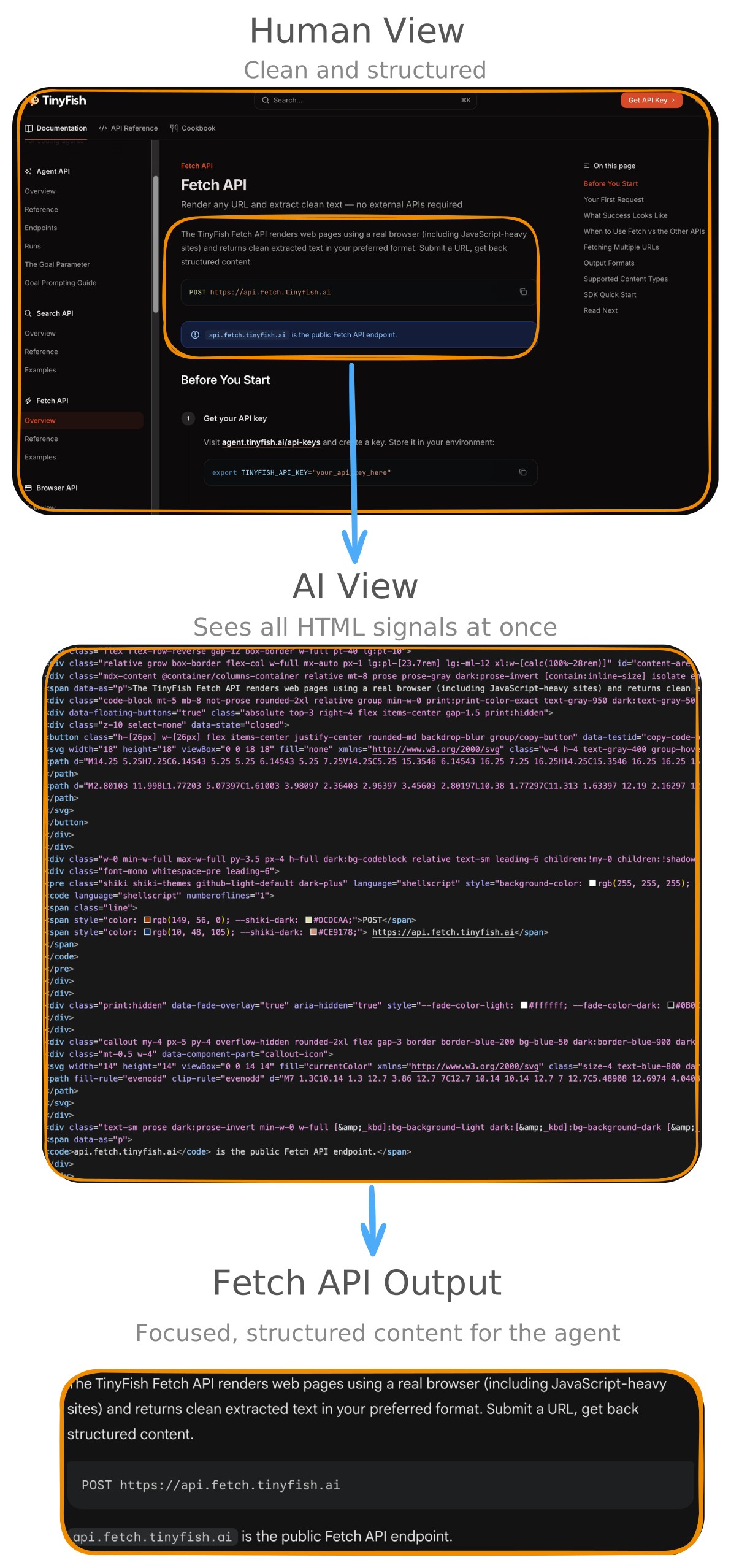
Fetch API is a dual-layer web page fetching and content extraction service built for AI agents. It renders URLs through Chromium, extracts structured content, and returns it in Markdown, HTML, or JSON through a single API.
It is built for reading web pages: articles, documentation, product pages, pricing pages, and other content-heavy URLs that agents need to understand quickly and reliably.
Modern agents need web access that is accurate after JavaScript execution, deterministic and structured for downstream tools, resilient when running autonomous workflows, and safe by default when handling arbitrary URLs.
The modern web is not optimised for that kind of consumption.
What looks like a readable page to a person often looks like noise to an agent: JavaScript shells, navigation chrome, cookie banners, injected widgets, ad blocks, and fragmented content spread across inconsistent HTML structures.

Even when the page does render, the result is often still hard to use. One site wraps key information in semantic markup; another buries it in nested divs. One page loads cleanly; another stalls behind retries, incomplete hydration, or bot defenses.
Web fetching is a systems problem. Not just getting HTML back. Getting the right content, in a usable form, with enough reliability for autonomous workflows.
Fetch API was designed as infrastructure. It removes parser work from the caller by returning agent-ready content plus metadata such as title, description, author, published date, and language in one response.
Fetch API combines two layers that are often stitched together in typical stacks:
Rendering alone is not enough. Extraction alone is not enough.
At the API level, the contract stays simple: send one request with one or more URLs, and get back structured content plus metadata.
curl -X POST <https://api.fetch.tinyfish.ai> \\\\
  -H "X-API-Key: $TINYFISH_API_KEY" \\\\
  -H "Content-Type: application/json" \\\\
  -d '{ "urls": ["<https://example.com>"] }'
When a request comes in, Fetch first solves the rendering problem, then the extraction problem, and finally the output-format problem.
If any one of those stages breaks down, the workflow becomes unreliable. Fetch is built to handle them as one pipeline.
Under the hood, Fetch API runs on TinyFish Browser, backed by a warm Chromium pool.
For agents, that means access to post-JavaScript page state even on sites where static fetches miss the content that actually matters.
After the page is rendered, Fetch moves from visibility to usability.
Its extraction pipeline is tuned for noisy and irregular HTML.
This is where many fetch pipelines break down. Getting the page is only the first half. The harder part is turning a messy, dynamic document into an agent-ready result.
Agents can choose output by workload:
The goal is simple: a docs page, a blog post, and a pricing page may all look different in raw HTML, but the caller should get the same kind of usable output back.
For agents, a page is only useful if its meaning survives contact with the model.
Different sites can express the same content through completely different DOM structures. Fetch is designed to normalize those differences into outputs that are easier to ground on, route through retrieval systems, and process in downstream automation.
Agent pipelines need systems that continue running even when the web is inconsistent.
Fetch API includes reliability defaults built for unattended jobs:
In practice, that means one bad page does not poison the entire job, and transient failures usually recover on the next attempt instead of forcing manual cleanup.
When agents fetch arbitrary URLs, safety controls cannot be optional.
Fetch API applies SSRF protections before fetch execution:
Operationally, Fetch API is built for production integration:
Beyond the core fetch flow, Fetch exposes a number of capabilities that other products do not provide in the same form.
The table below compares Fetch API with Exa, Firecrawl, and Crawl4AI based on publicly documented capabilities.
✓ = first-class documented support, ~ = supported through a separate flow or different integration model, — = not exposed as a first-class documented feature

Comparison based on publicly documented product behaviour as of April 13, 2026.
When the job is to read and extract content from a URL, Fetch is the right layer. When the job requires clicking, navigating, logging in, or filling forms, that is where the broader TinyFish browser and agent stack comes in.
Fetch is the reading layer in that stack: the part that turns live pages into stable inputs for reasoning and downstream workflows.
We are already working on the next set of capabilities for Fetch API, including smarter caching, subdocument querying, richer output options, and lower-latency controls. The direction is simple: make Fetch faster on repeat work, more selective in what it returns, and easier to tune for different agent workloads.
AI agents are only as good as the web substrate beneath them.
TinyFish Fetch API is live today. Get an API key and let us know if it makes your agent's life better.
No credit card. No setup. Run your first operation in under a minute.